HR software for UK employers

The simple HR system for teams that work in shifts

Staff records, right to work checks, rotas, holidays and clocking in, all in one place, with UK employment rules built in. And an app your team will actually use.

  • No card needed
  • Set up in minutes
  • Your data stays in the UK
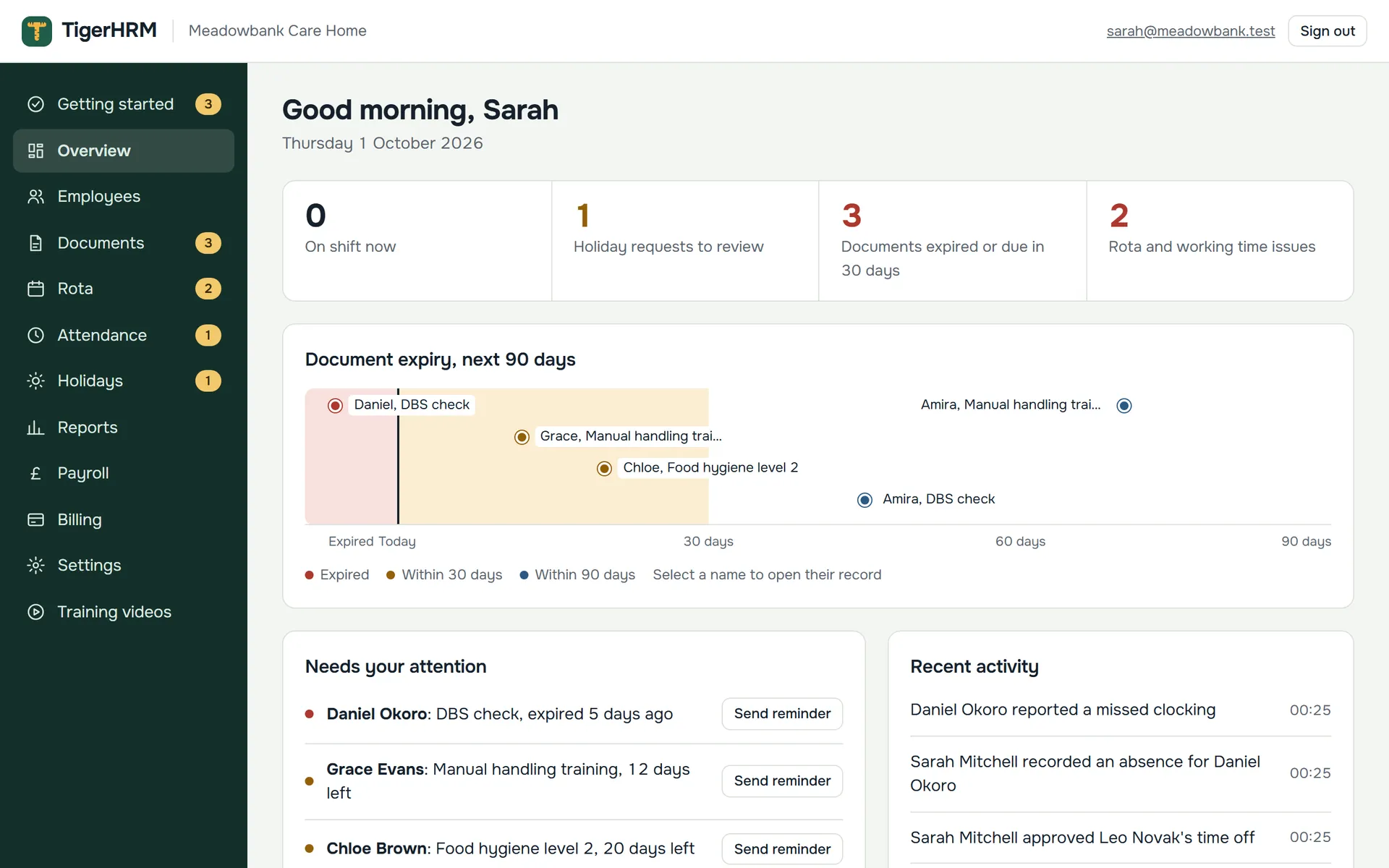
The TigerHRM overview: who's on shift, holiday requests, expiring documents and rota issues at a glance
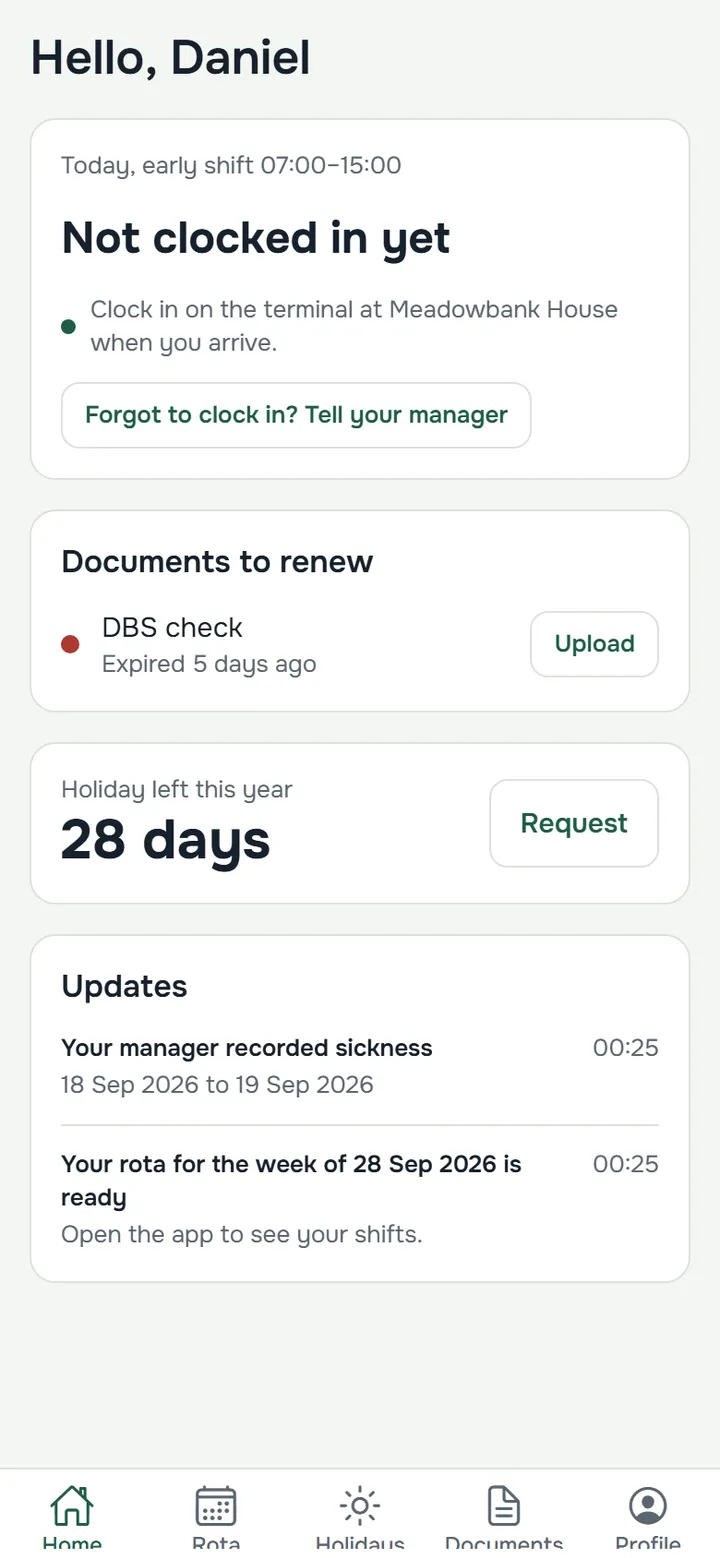
The staff app home screen: today's shift, documents to renew and holiday left
Made for Care homes Hospitality Cleaning Security Any team that works in shifts
Sound familiar?

Still running your team on spreadsheets, paper and group chats?

TigerHRM replaces the folders, the rota spreadsheet and the paper timesheets with one system that keeps you compliant without the extra work.

“Whose DBS check runs out next month?”

TigerHRM tells you. Every document has an expiry date, and you and your employee are reminded 90, 60, 30 and 7 days before it runs out.

“The rota’s changed again, has everyone seen it?”

Publish once, everyone knows. Staff see their shifts in the app and are told when anything changes. Swaps go through you.

“Did they really start at seven?”

Clocked on site, not on a sheet. Staff clock in on a terminal or tablet at work, so hours are accurate and ready for payroll.

Features

Everything you need to run a shift-based team

From the day someone joins to the day they’re paid. Every part works together, so you only enter things once.

Staff records and documents

Every document in date, every check on record

Keep each employee’s details, contracts and documents in one secure place, and never be caught out by an expired certificate again.

  • Expiry reminders at 90, 60, 30 and 7 days, to you and the employee
  • Right to work checks recorded properly: method, who checked, when, and follow-up dates
  • Staff upload renewed documents straight from their phone
  • National Insurance numbers, bank details and pay rates encrypted
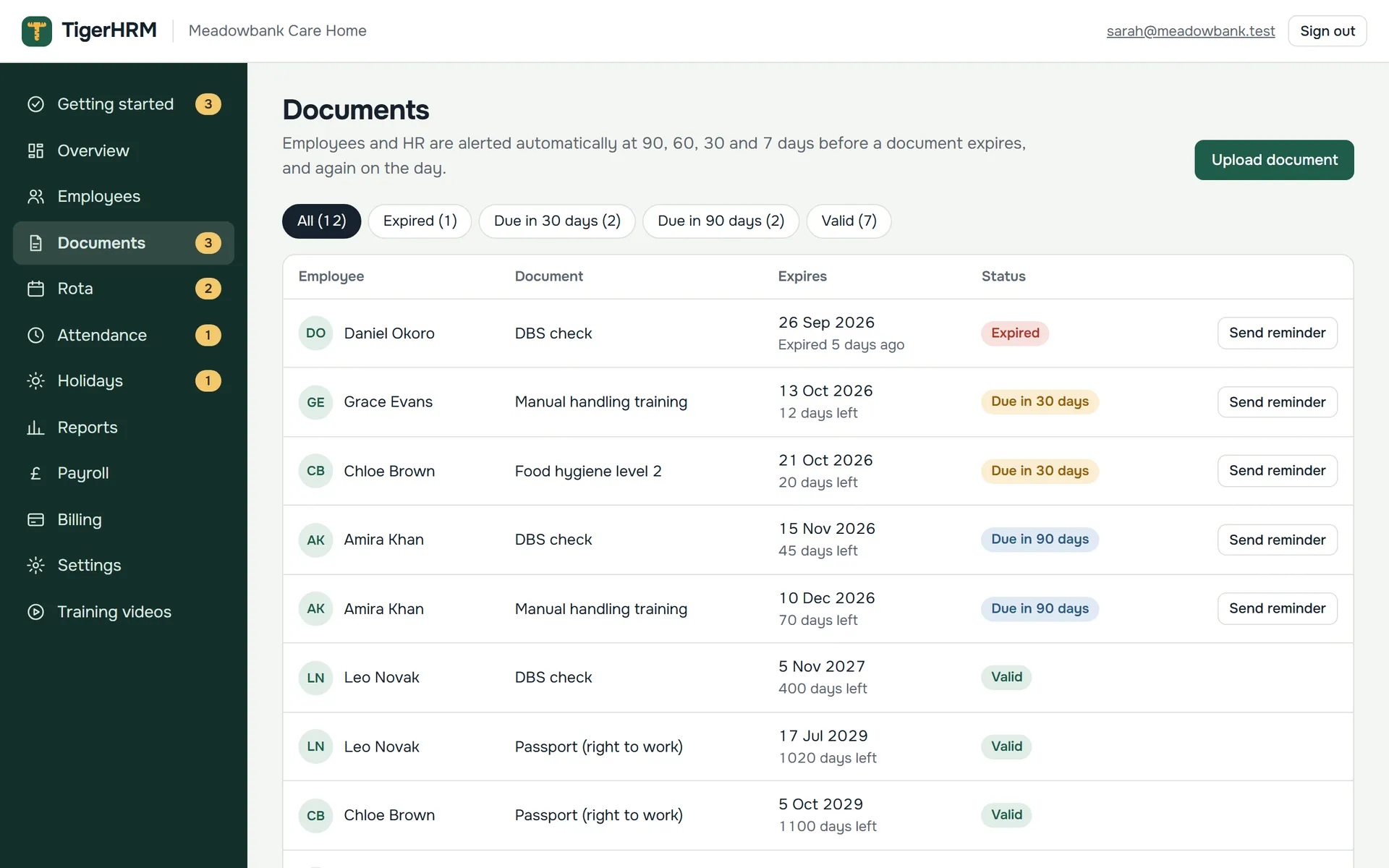
The documents page listing expired, due and valid documents for every employee
Rotas

Plan the week in minutes, and catch problems before they happen

Build rotas from your own shift types. TigerHRM checks as you go and warns you before you make a costly mistake.

  • Warnings for holiday clashes, expired documents, 11-hour rest, breaks and the 48-hour week
  • No double-booking, and overnight shifts and clock changes handled for you
  • Publish the week and everyone on it is told
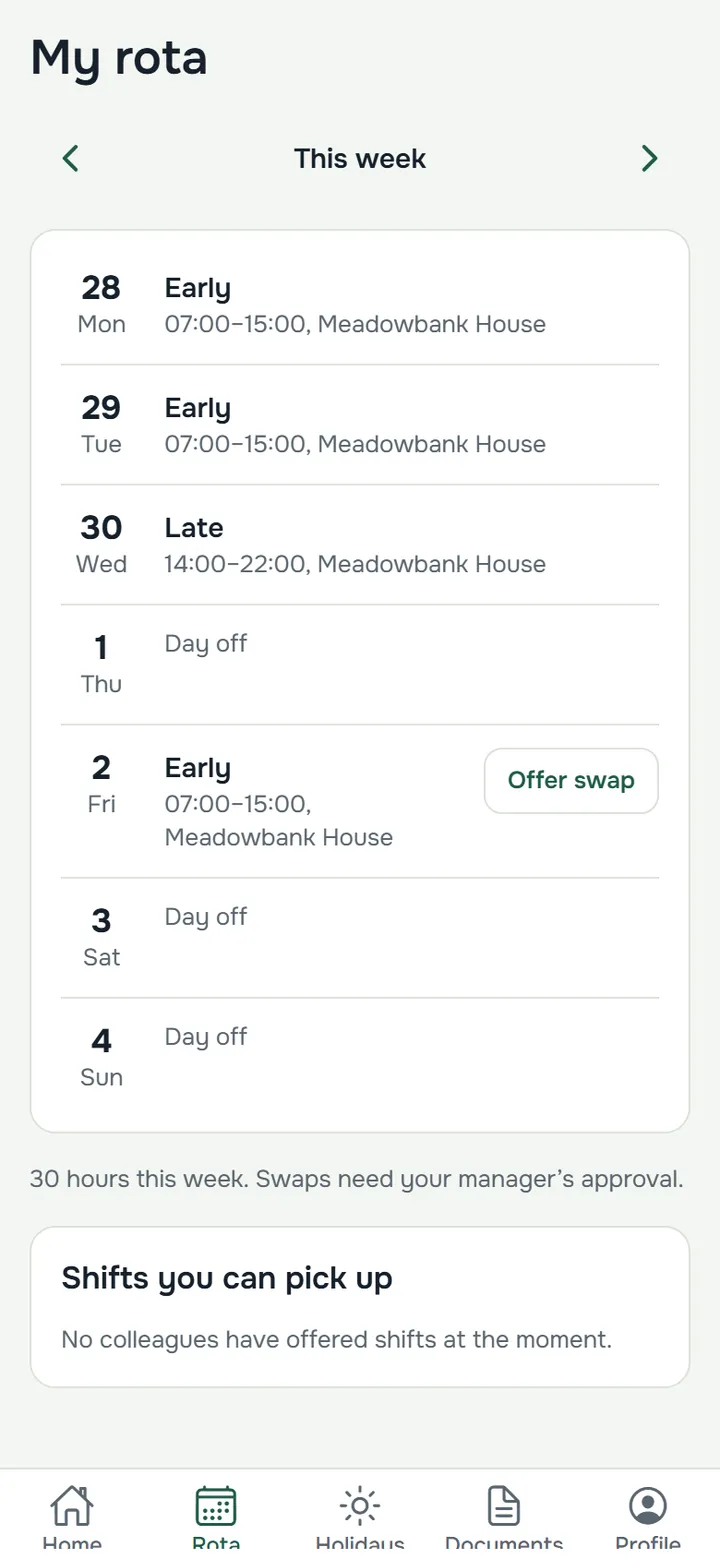
  • Staff swap shifts in the app, and you approve them
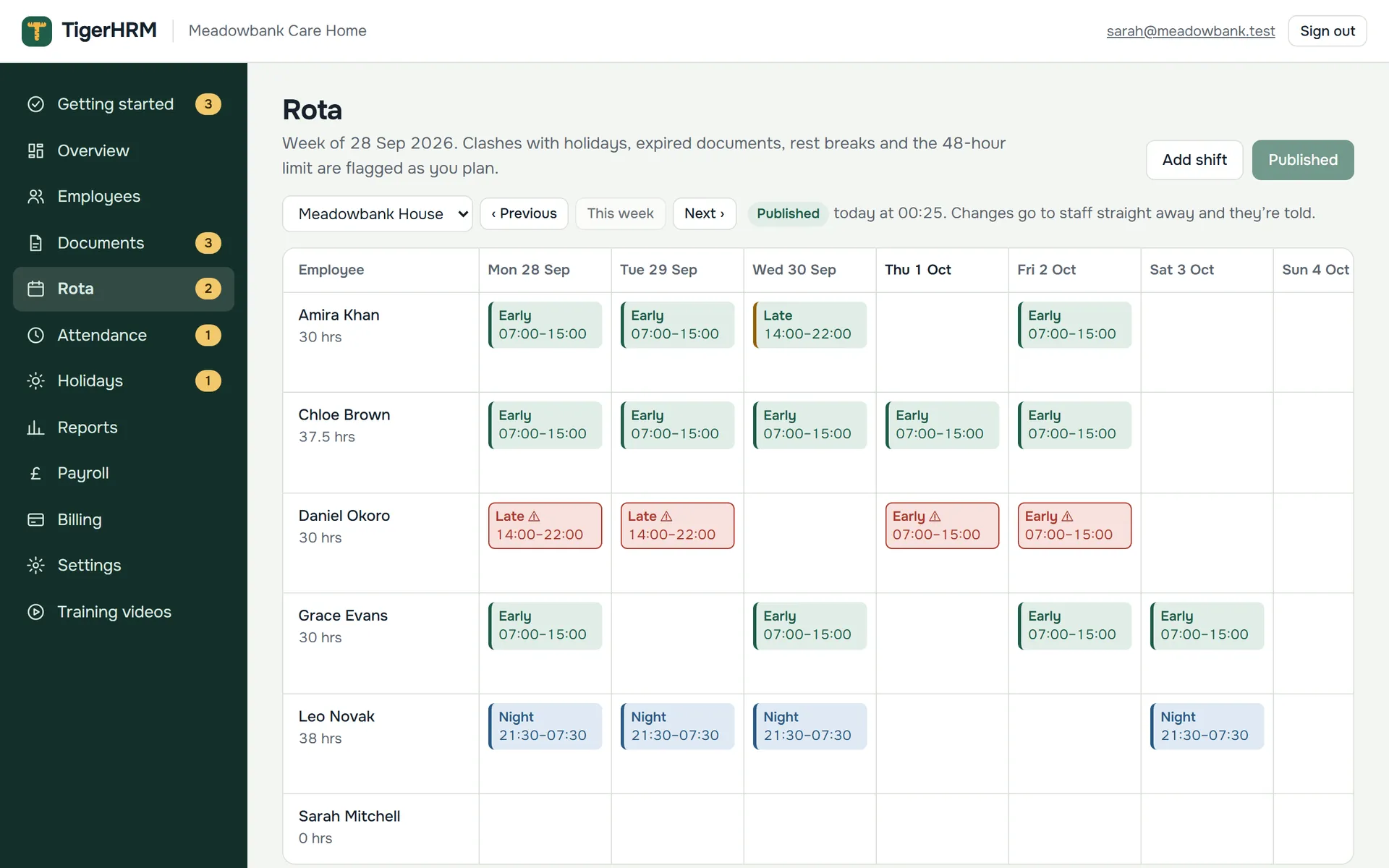
A weekly rota with early, late and night shifts, and warnings on shifts that need checking
Time and attendance

Real clocking in, on site

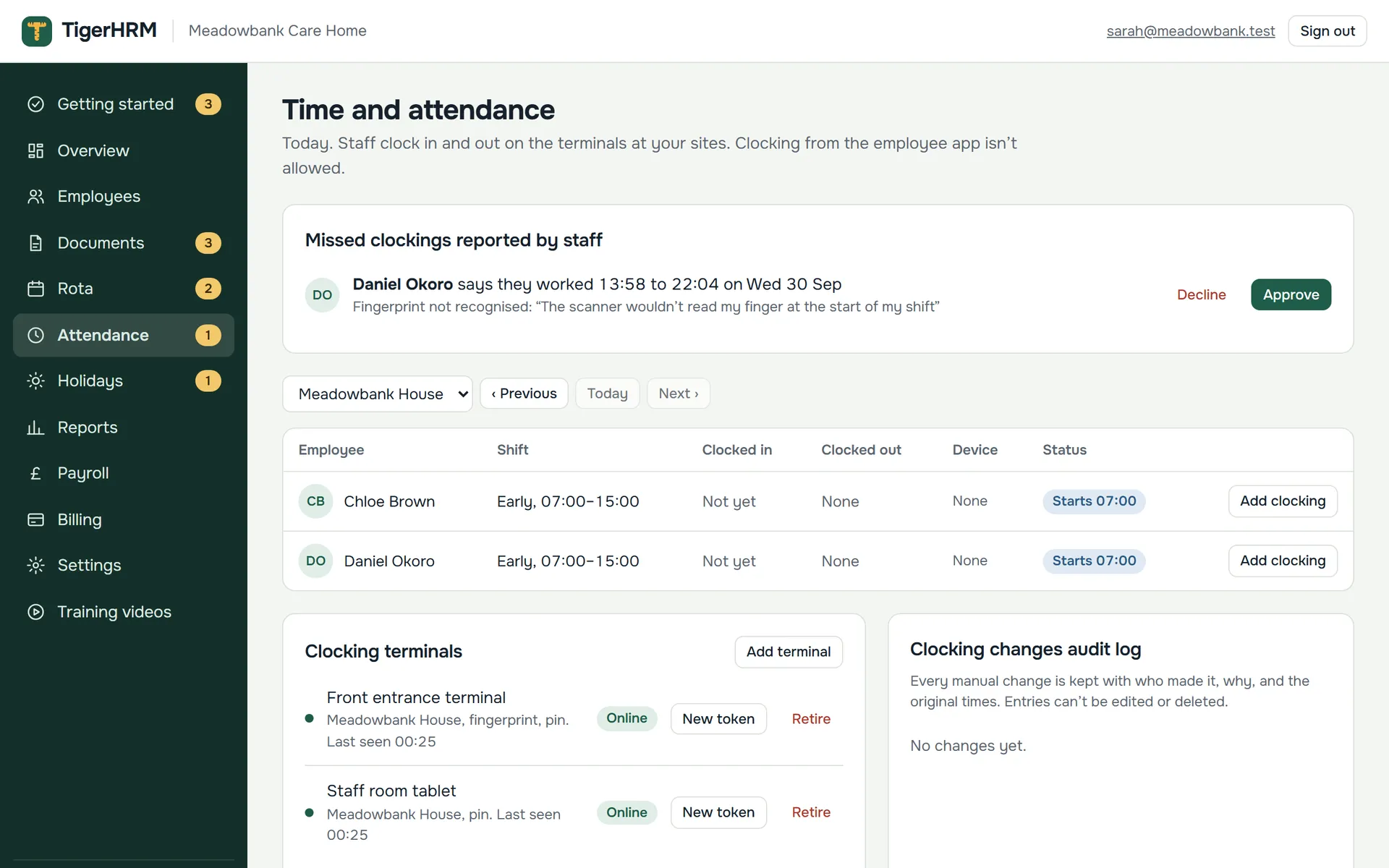
Staff clock in and out at work with a fingerprint, card or PIN, or on a tablet by the entrance. You see who’s in, live.

  • Fingerprint, card or PIN terminals, or turn any tablet into a clocking kiosk
  • No clocking in from the car park: only people you allow, like home workers, can clock in from the app
  • Forgot to clock? Staff report it in the app and a manager approves it
  • Every correction is logged with the original times, and terminals keep working offline
Time and attendance: today's shifts, clock-ins, missed clockings to approve and clocking terminals
Holiday and absence

Holiday worked out for you, the UK way

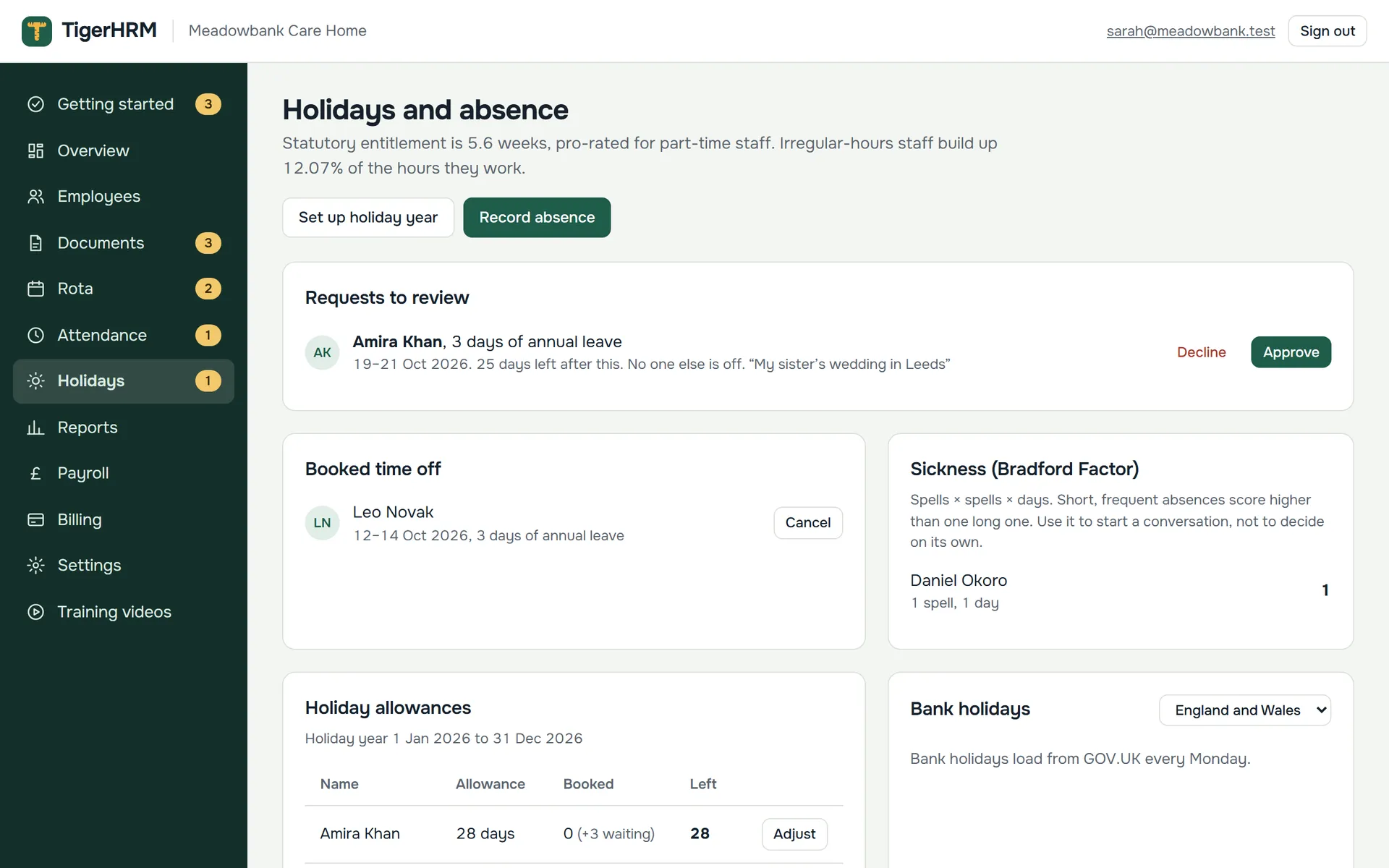
Staff ask for time off in the app. You see who else is off and approve with a tap. Balances look after themselves.

  • 5.6 weeks’ statutory holiday, pro-rated for part-time staff
  • 12.07% accrual for irregular-hours and part-year workers
  • Bank holidays for England and Wales, Scotland and Northern Ireland
  • Sickness recorded with Bradford Factor scores
Holidays and absence: requests to review, booked time off, sickness and holiday allowances
The staff app

An app your staff will actually use. No app store needed.

Staff get an email invite, set a password and they’re in. It works on any iPhone or Android phone, and can be added to the home screen like any other app.

  • Their rota, holiday balance and documents, always up to date
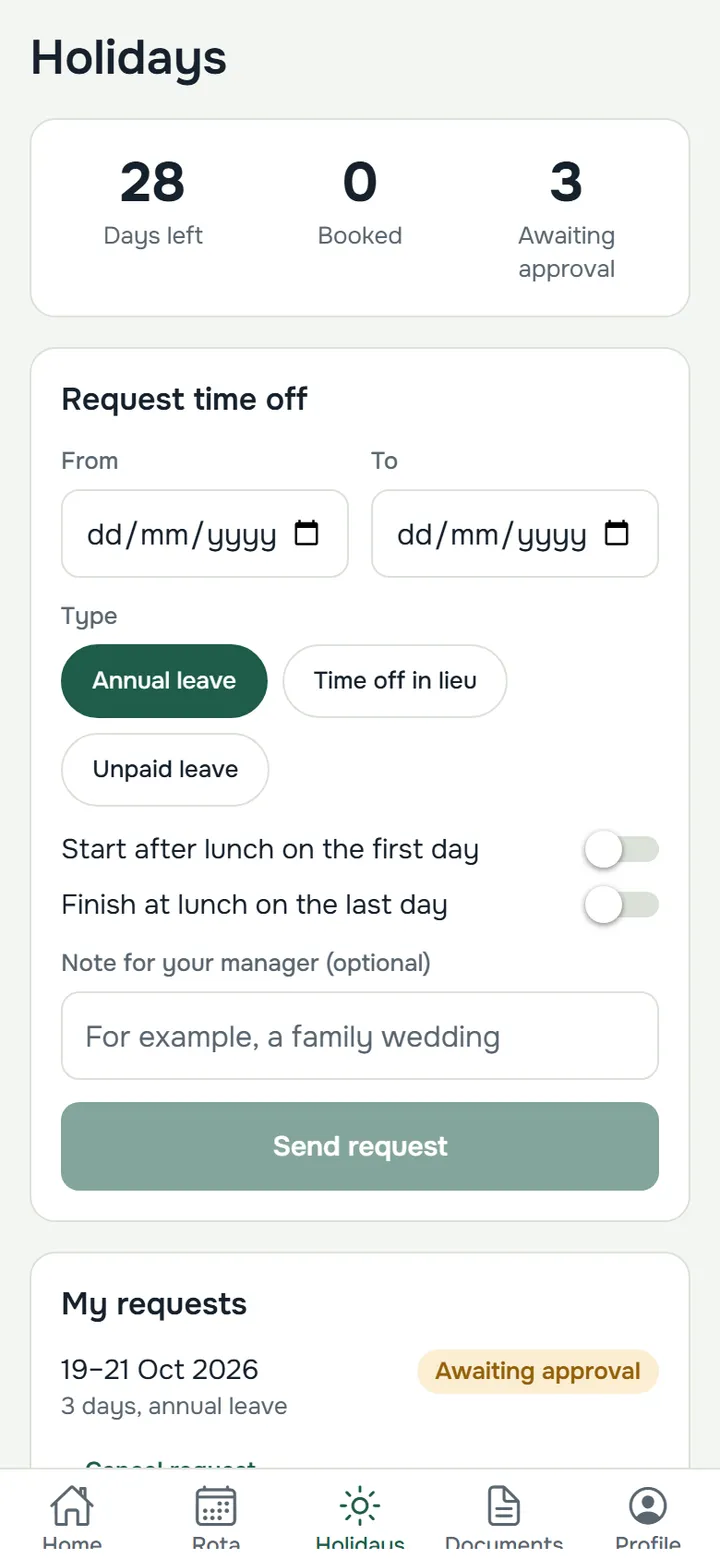
  • Request holiday, swap shifts and report a missed clocking
  • Notifications in the app and by email
  • Short training videos built in
The staff app rota: this week's shifts with an option to offer a swap
The staff app holidays screen: days left and a form to request time off
Reports and payroll

Ready for inspections, ready for payday

The reports inspectors and auditors ask for, and payroll figures you can trust, in a couple of clicks.

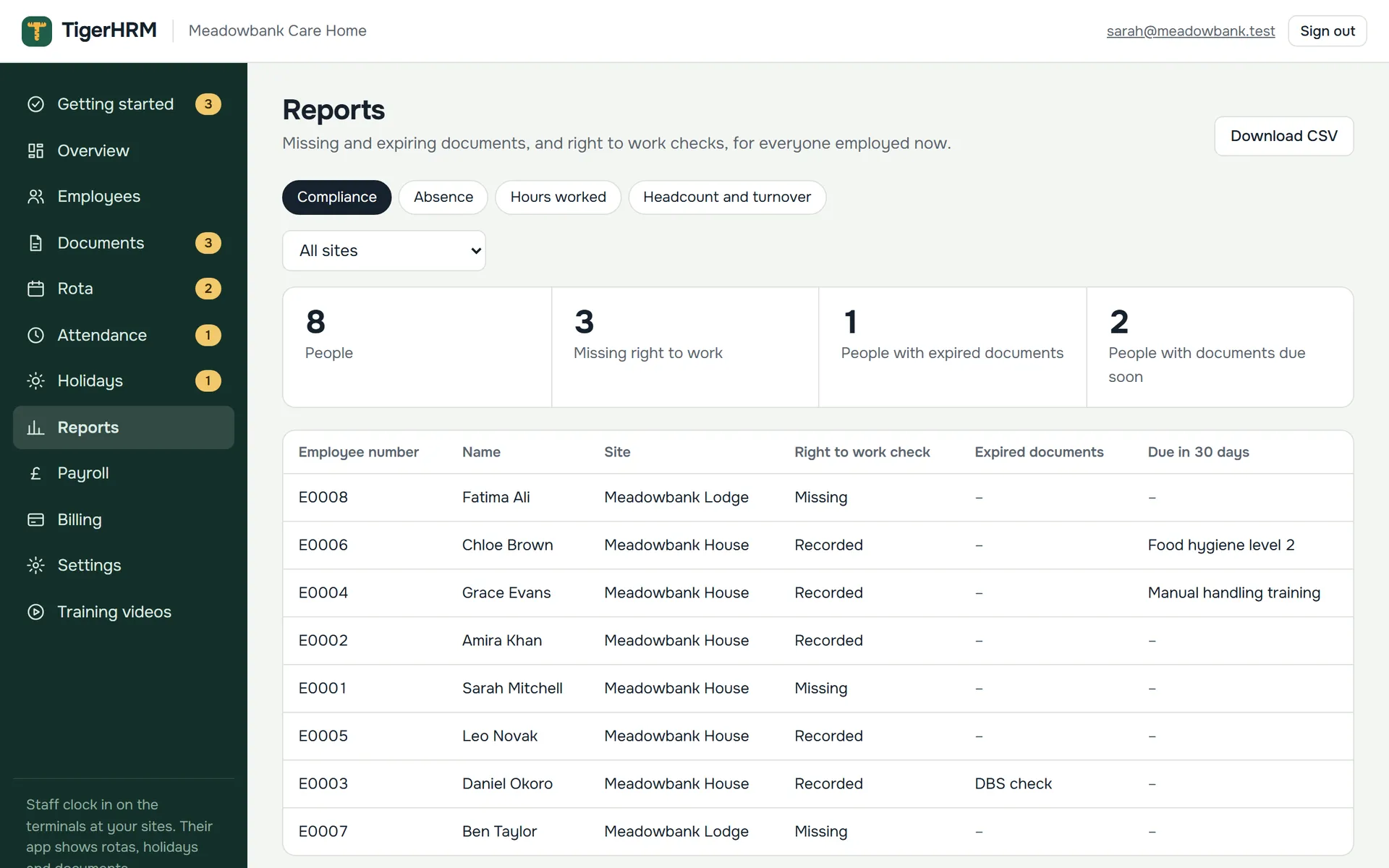
  • Compliance: missing and expiring documents and right to work checks
  • Absence with Bradford Factor, hours worked, headcount and turnover
  • Approve timesheets, then export a payroll file for your payroll software
  • Exported periods are locked, so the figures can’t change afterwards
The compliance report showing right to work checks and expiring documents for every employee

Several sites

Each with its own time zone, rota and terminals.

Managers per site

Managers only see the people at their sites. Owners and HR see everything.

Notifications

In the app and by email. Everyone chooses what they’re told about.

Your rules

Holiday and absence rules you can change as employment law changes.

Shift swaps

Staff offer and pick up shifts. Nothing changes until you approve.

Full audit trail

Who viewed or changed a record, when, and what it was before.

Training videos

Short, captioned videos for managers and for staff.

Getting started guide

A checklist that walks you through setting up.

How it works

Up and running today

No installation, no consultants and no long contract. Most teams are set up in an afternoon.

Sign up and add your sites

Create your account, add your sites and choose your shift types and holiday year.

About 5 minutes

Add your staff and invite them

Add people one by one, then send invites. Staff set a password and they’re in the app.

A few minutes per person

Plan, publish and start clocking

Build your first rota, publish it, and set up a terminal or a tablet kiosk at each site.

Ready the same day
Why TigerHRM

Built for UK employers, not adapted for them

Generic HR tools leave the hard parts to you. TigerHRM was designed around UK employment law and the reality of shift work.

UK employment law built in

Working Time Regulations, statutory holiday, right to work checks and regional bank holidays, with rules you can change as the Employment Rights Act reforms arrive.

Made for shift work

Night shifts, split sites, part-timers and irregular hours are normal here, not an afterthought. So are managers who only look after their own site.

Fair, simple pricing

Pay for the people you employ now. Leavers don’t count. Monthly or yearly, no set-up fees, and you can cancel any time.

Secure and private

Your data is kept in the UK. Two-step sign-in for employers, encrypted personal details and a record of everyone who looks at them.

Nothing to install

Works in any browser. Staff use their own phones, and any tablet can be a clocking kiosk. No servers, no downloads, no IT project.

Easy from day one

A 14-day free trial with everything included, a step-by-step setup checklist, training videos and real people to help.

Security and UK GDPR

Your people’s data, looked after properly

HR records are some of the most sensitive data a business holds. TigerHRM is built so you can show exactly who has seen what, and prove you’re protecting it.

  • Hosted in the UKOn Amazon Web Services in London, with nightly backups.
  • EncryptedEvery connection, plus NI numbers, bank details and pay rates. Documents are kept private and opened only through short-lived links.
  • Two-step sign-inRequired for every employer account, with limits on repeated wrong passwords.
  • Everything auditedViews of personal records and every change are logged, with before and after.
  • No fingerprints storedWe record consent only. Staff can always use a PIN instead.
Pricing

Simple pricing that grows with you

Pay only for your active employees. Try everything free for 14 days first, no card needed.

Loading prices…

  • 14-day free trial, no card needed
  • Staff app for iPhone and Android
  • Leavers never count towards your bill
  • UK hosting and two-step sign-in
  • Training videos and support
  • No set-up fees, cancel any time

Large team, several companies or something special in mind? Talk to us about a tailored plan.

Partner programme

Recommend TigerHRM and earn commission

For accountants, payroll bureaus, HR consultants and care or hospitality advisers. Introduce your clients to TigerHRM and earn a share of what they pay.

  • Your own referral link: companies who sign up with it are linked to you
  • Commission on every payment they make, as agreed with you
  • A partner dashboard showing your companies and what you’ve earned
Become a partner
FAQ

Questions people ask us

Can’t find your answer? Ask us and we’ll get back to you.

Who is TigerHRM for?

UK employers whose teams work in shifts: care homes, hotels, restaurants and pubs, cleaning and security companies, and anyone else with a rota. It works just as well for one site with ten staff as for several sites with hundreds.

How much does it cost?

You pay for each active employee, monthly or yearly (yearly works out cheaper). People who have left don’t count. There are no set-up fees. See the prices above, or ask us about a tailored plan for larger teams.

Is there a free trial?

Yes. You get 14 days with everything included and no card needed, so you can add your staff and try it properly. Choose a plan whenever you’re ready.

Do my staff need to download an app?

No. Staff open TigerHRM on their phone from the invite email, and can add it to their home screen on iPhone or Android so it opens like any other app. There’s nothing to find in an app store.

Can staff clock in from their phones?

Only if you allow it. Normally clocking in happens on the terminal or tablet at your site, so nobody can clock in from the car park. For people who work remotely or from home, you can switch on clocking from the app, person by person. Those clockings use TigerHRM’s time, not the phone’s, and are marked on timesheets. If someone forgets to clock, they report it in the app and a manager approves or declines it.

What do we need for clocking in?

Either a fingerprint, card or PIN terminal at each site, or simply a tablet by the entrance showing TigerHRM’s clocking kiosk, where staff type a personal PIN. Get in touch if you’d like help choosing.

Do you store fingerprints?

No. We only record that an employee has agreed to use their fingerprint; the fingerprint itself stays on the terminal. Only the employee can give or withdraw that consent, and everyone can use a PIN instead.

Does it follow UK holiday rules?

Yes: 5.6 weeks’ statutory holiday (28 days for a five-day week), pro-rated for part-time staff, 12.07% accrual for irregular-hours and part-year workers, and bank holidays for England and Wales, Scotland and Northern Ireland. You can adjust the rules for your company, so you’re ready as employment law changes.

Will it help with right to work and DBS checks?

Yes. Record each right to work check (method, who checked, when and the outcome) alongside the evidence, with follow-up dates for time-limited permission. You and the employee are reminded before any document expires, and the rota warns you if someone’s document has run out.

Where is our data kept, and is it secure?

In the UK, on Amazon Web Services in London. Every connection is encrypted, National Insurance numbers, bank details and pay rates are encrypted separately, and documents are kept in a private store. Employer accounts use two-step sign-in, and every view or change of a personal record is logged.

Can managers see only their own site?

Yes. Give someone manager access for one or more sites and they only see those employees, rotas and requests. Owners and HR admins see everything.

How does it work with payroll?

Once the timesheets for a period are approved, export them as a file for your payroll software. The period is then locked, so the figures can’t change afterwards. Reports download as spreadsheets too.

Can we cancel?

Yes, at any time from the Billing page. Even after cancelling, you can still sign in to download your reports and payroll exports.

How do we get help?

TigerHRM includes short training videos for managers and for staff, and you can contact us any time using the form below. Staff with questions about their shifts, holiday or pay should ask their manager first.
Contact us

Let’s talk

Book a demo, ask about pricing, or tell us what your team needs. We’ll reply by email.

  • See it in actionA short online demo using your own situation, at a time that suits you.
  • Already a customer?Sign in to TigerHRM, or use the form and choose “Help with my account”.
  • Prefer email?Write to us at info@tigerict.com.
  • Work for a TigerHRM customer?For shifts, holiday or pay, please ask your manager or HR team. They can help fastest.
What would you like to talk about?

We’ll only use your details to reply to you. See our privacy notice.

Make HR the easy part of your week

Swap the spreadsheets, paper timesheets and group chats for one simple system. Try it free for 14 days, no card needed.